Guides
How to Read an RV Battery Monitor: What the Numbers Actually Mean
Researched from published standards and manufacturer specifications. Updated .
Quick answer
A shunt-based battery monitor is the single most useful instrument on an RV electrical system, and also the most commonly misread. Owners glance at a percentage on the display and treat it as gospel without understanding that the number is a running count, not a live measurement, and that count can drift if the monitor is never told what a true full charge looks like.
This guide covers what a shunt actually does, what each number on the display means, why voltage alone is a poor state of charge indicator on lithium, and the synchronizing step that keeps a monitor's count accurate over months of use. Setting up state of charge tracking without a shunt is covered separately on the battery state of charge calculator, which uses resting voltage instead and comes with its own real limitations.
What is a shunt, and why does it sit on the negative cable?
A shunt is a precision low-resistance resistor that every amp of current to and from the battery bank must pass through, and the monitor measures the tiny voltage drop across it to calculate exactly how much current is flowing at any instant. It sits on the negative side of the battery, between the battery's negative terminal and every load and charge source, specifically so that all current, whether coming in from the converter and solar or going out to every 12V load and the inverter, is forced through that one measurement point. If any load or charge source is wired to bypass the shunt, its current goes uncounted and the monitor's running total quietly becomes inaccurate, which is the most common wiring mistake in a monitor installation. The short cable from the battery's own negative terminal connects to the shunt's battery-side terminal, and a separate cable from the shunt's other terminal continues on to the bus bar that feeds every load and charge source, which is the wiring order that forces all of that current through the measurement point rather than around it.
What do the numbers on the display actually mean?
State of charge is a running percentage based on amp-hours counted in and out since the last time the monitor was told the battery was at 100 percent, not a live voltage reading. Amp-hours consumed tracks how far below full the battery currently sits, in actual amp-hours, which is often more directly useful than the percentage for comparing against a daily budget calculated elsewhere on this site. Current shows the instantaneous flow through the shunt, with a positive number meaning the battery is charging and a negative number meaning it is discharging, so a monitor reading negative while the converter is running usually means the connected loads are drawing more than the converter is supplying at that moment. Time remaining estimates how long the battery will last at the present draw if nothing changes, which makes it accurate only for as long as the current draw stays roughly constant, and unreliable the moment a load turns on or off.
Why is voltage such a poor state of charge indicator on lithium?
Voltage-based state of charge works reasonably well on lead-acid, where voltage drops fairly steadily across the discharge curve, but it is a poor tool on LiFePO4, where the curve stays nearly flat across most of the usable range. The tables below are the resting voltage state of charge figures used elsewhere on this site, shown side by side to make the flatness of the lithium curve visible.
| State of charge | Lead-acid resting voltage | LiFePO4 resting voltage |
|---|---|---|
| 100% | 12.73V | 13.6V |
| 90% | 12.62V | 13.4V |
| 70% | 12.37V | 13.2V |
| 50% | 12.10V | 13.10V |
| 30% | 11.81V | 13.00V |
| 10% | 11.51V | 12.60V |
| 0% | 11.36V | 12.0V |
Convention Source: Resting voltage state of charge tables used across this site's calculators. LiFePO4 voltage is nearly flat between roughly 20 and 90 percent, so treat those middle rows as approximate; a shunt monitor is the accurate method across that range.. Readings are only valid on a battery that has rested off charge and off load for several hours. Under load or while charging, voltage tells you almost nothing about actual state of charge on either chemistry.
What does synchronizing a monitor actually mean, and why does it need to happen?
Synchronizing is the moment the monitor resets its running count to 100 percent because it has detected, or been told, that the battery has actually reached a true full charge. Every shunt monitor's state of charge number is built from adding and subtracting counted amp-hours since the last sync point, and small measurement errors accumulate over days and weeks the same way a pedometer's step count can drift from your actual distance. Charging the bank to a genuine full charge regularly, not just to a voltage that looks close to full, and letting the monitor detect or confirm that full point, corrects that accumulated drift and is the single maintenance step that keeps a monitor's percentage trustworthy over months rather than a monitor that reads confidently wrong.
What is the order of operations for setting up a new monitor correctly?
Install the shunt on the negative cable so that every load and every charge source routes through it, with no circuit wired to bypass it. Program the monitor with the battery bank's actual nominal amp-hour capacity and chemistry, since the state of charge percentage is calculated against whatever capacity number you enter, and an incorrect capacity produces a confidently wrong percentage from the first day. Charge the bank to a full charge before trusting any reading, then manually sync or confirm the monitor recognizes that full point. Discharge and recharge normally for the first cycle or two, checking that the state of charge tracks sensibly, before relying on the monitor's time remaining estimate for real trip planning.
Can a monitor's amp-hour count ever be wrong even after syncing?
Yes, if a load or charge source is wired to bypass the shunt after the initial installation, which happens more often than expected when an accessory gets added later and grounded to a convenient point rather than routed back through the shunt's measurement side. A monitor that reads a slowly growing discrepancy against what a full recharge should show, even right after a sync, is worth checking for exactly this kind of bypassed wiring rather than assuming the shunt hardware itself has failed.
Is a battery monitor the same thing as the BMS inside my battery?
No, and the two serve different purposes even though both track information about the battery. A BMS lives inside the battery itself, on a LiFePO4 pack, and its job is protection: disconnecting the battery if it is over-discharged, overcharged, drawn beyond its rated current, or, on some models, charged outside a safe temperature range. It generally has no display of its own and reports little or nothing to the rest of the system beyond simply working or cutting out. A shunt-based battery monitor is a separate, external device whose job is reporting: showing state of charge, amp-hours consumed, current and time remaining so the owner actually knows where the battery stands well before the BMS would ever need to step in and protect it. Some higher-end lithium batteries do expose BMS data over Bluetooth to a phone app, which blurs the line somewhat, but that app-based BMS reporting still is not the same detailed amp-hour counting a dedicated shunt monitor provides, and it usually cannot see loads and charge sources elsewhere in the system the way a whole-system shunt on the main negative cable can. Running both is not redundant: the BMS protects the battery from damage as a last resort, while the shunt monitor is the tool that lets you avoid ever reaching that last resort in the first place by showing the real state of charge in time to change your plans.
Every current path must run through the shunt. A load or charge source wired to bypass the shunt goes uncounted and slowly corrupts the state of charge reading. Route every new accessory back through the shunt's measurement side, not straight to a convenient ground point.
Which monitor to buy
Every shunt monitor in this catalog measures the same core numbers the same way. The differences are in display type, app history and alarm features, not in the basic accuracy of the amp-hour count itself, which comes from the shunt hardware rather than the display.

AILI TR16 Shunt Battery Monitor
$42.00A basic dedicated display covering the same core numbers, state of charge, amp-hours and current, at the lowest price point here.
Best for: A first real state of charge readout.
Check price on Amazon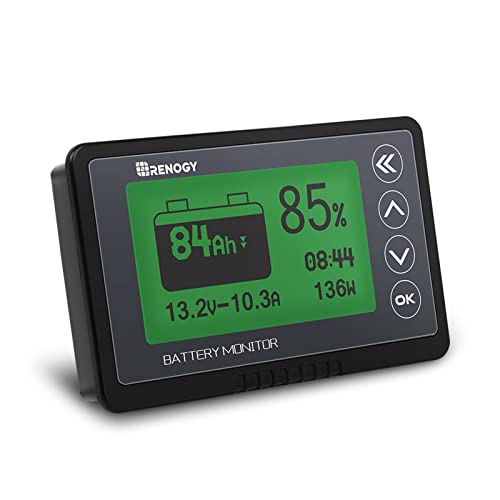
Renogy 500A Battery Monitor with Shunt
$63.10A straightforward shunt and display combination with no app dependency to read the core numbers.
Best for: A panel-mounted readout.
Check price on Amazon
LiTime 500A Bluetooth Battery Monitor
$109.99Logs amp-hour and current history over time, useful for spotting a slow drift between sync points.
Best for: A build that may change system voltage later.
Check price on Amazon
Victron SmartShunt 500A Battery Monitor
Price varies, check the listingDetailed synchronization history and alarms, for a build where tracking accuracy matters most.
Best for: Any lithium bank you plan to boondock on.
Check price on AmazonFrequently asked questions
- Why does my battery monitor show a different percentage than a simple voltage check?
- Because the monitor counts actual amp-hours in and out rather than reading voltage, which is a more accurate method, especially on LiFePO4, where voltage stays nearly flat across most of the usable range. Trust the shunt monitor's counted percentage over a separate voltage-based estimate once the monitor has been properly synced.
- What does a negative current reading mean on my monitor?
- A negative number means the battery is discharging, meaning more current is currently flowing out to loads than is flowing in from any charge source. A positive number means the opposite, the battery is net charging at that moment. Watching the sign change is a quick way to tell whether a given charge source is currently keeping up with your loads.
- How often should I sync my battery monitor?
- Every time the bank reaches a genuine full charge, which for many boondocking rigs happens naturally whenever plugged into shore power for a full charge cycle. If the rig rarely reaches a true full charge for weeks at a time, the monitor's percentage can drift further from accurate, so charging to full periodically is worth doing partly to correct the count.
- Why is my monitor's time remaining estimate sometimes way off?
- Because it calculates remaining time based on the current draw at that exact instant, assuming it stays constant. Turning on an air conditioner or a microwave changes the draw dramatically, and the estimate updates to reflect the new draw rather than predicting future changes, so it is only reliable as a short-term snapshot, not a fixed prediction.
- Do I need to enter my exact battery capacity for the monitor to work correctly?
- Yes. The state of charge percentage is calculated against whatever capacity number is programmed into the monitor, so an incorrect capacity produces a percentage that looks precise but is calculated against the wrong total. Enter the nominal amp-hour rating from your battery's actual spec sheet, not an estimate.
- Can I use resting voltage instead of a shunt monitor to check state of charge?
- You can on lead-acid, where voltage drops fairly steadily across the discharge curve, but it is unreliable on LiFePO4, where voltage stays nearly flat between roughly 20 and 90 percent charge. A shunt monitor is the more accurate tool on lithium specifically because it does not depend on that flat voltage curve at all.
Trust the count, but keep it honest. A shunt monitor is only as accurate as its last sync and the wiring routed through it. Charge to a true full charge regularly and confirm every load and charge source runs through the shunt.