Monitoring
Best RV Battery Monitors and Shunts for Reading Lithium State of Charge
Researched from published standards and manufacturer specifications. Updated .
Quick answer
A battery monitor built around a shunt measures actual current flowing in and out of the battery bank and integrates it over time to track amp-hours used, which is a direct measurement of state of charge. A voltmeter only measures voltage, and for LiFePO4 chemistry, voltage stays nearly flat across most of the usable charge range, which makes a voltmeter close to useless for reading how much charge is actually left.
All four monitors here are shunt-based and share the same 500A current rating, so voltage range, app connectivity, and whether a wired display is included are what actually separate them.
Why a voltmeter cannot read a lithium battery accurately
LiFePO4 voltage stays nearly flat between roughly 20 percent and 90 percent state of charge, which is exactly the range most RVers actually use day to day. A voltmeter reading in that band cannot reliably distinguish a bank at 30 percent from one at 80 percent, since the voltage difference between them is small and easily skewed by temperature or a load pulling current at the moment of the reading. A shunt-based monitor instead counts amp-hours in and out directly, which tracks state of charge accurately regardless of where the battery sits on that flat part of the curve.
Battery monitors and shunts compared
Every unit here is rated for 500A, which comfortably covers a 2000W or even a 3000W inverter's full-load draw, so voltage range and display style are the real points of comparison.
| Monitor | Amp rating | Voltage range | Bluetooth app | Wired display |
|---|---|---|---|---|
| Victron SmartShunt 500A | 500A | 6.5V to 70V | Yes | No, app only |
| Renogy 500A Monitor | 500A | Not published | No | Yes, wired display head |
| LiTime 500A Bluetooth | 500A | 8V to 120V | Yes | No, app only |
| AILI TR16 | 500A | 8V to 120V | No | Yes, wired display head |
Published standard Source: Manufacturer published specifications for each listed monitor.. A wider voltage range matters mainly if the system might later move to 24V or 48V; most single 12V battery setups will never use the top of that range.
Shunt placement: why it goes on the negative, not the positive
A shunt has to sit in the one path that every amp of current, in either direction, is forced through, which is why it is wired into the battery's negative cable between the battery terminal and everything else the bank feeds, including the chassis ground. Anything wired to the battery side of the shunt instead of the load side will not be counted, which throws off the amp-hour math the monitor depends on. This is the most common installation mistake with any shunt-based monitor and is worth double-checking against the manufacturer's own wiring diagram before buttoning up the install.
Reading a monitor's other numbers, not just percentage
State of charge is the headline figure, but a shunt monitor typically also reports real-time current draw, which is the more useful number when diagnosing a problem. A fridge that should draw a few amps but is showing a much higher current draw on the monitor points to a failing compressor or a wiring fault long before a temperature problem would show up. Time-to-empty and time-to-full estimates are also common on these displays, though they update based on the current draw at that exact moment, so they swing quickly as loads turn on and off rather than settling on one stable number.
Setting the battery capacity correctly during setup
Every shunt-based monitor needs the battery bank's rated amp-hour capacity entered during setup, since that number is what the monitor uses to calculate a state of charge percentage from the raw amp-hour count it measures. Entering the wrong capacity, for example leaving a default value in place after upgrading to a larger battery, produces a state of charge reading that is consistently wrong even though the underlying amp-hour counting is accurate. This is a common setup mistake worth double-checking any time the battery bank changes size, not just on first installation.
Monitors on a paralleled battery bank
A single shunt can monitor multiple batteries wired in parallel as long as all of the bank's connections, including the connections between the individual batteries themselves, run through the shunt's load side rather than bypassing it. Wiring a second battery directly to the first battery's terminal instead of through the shared busbar the shunt monitors will cause that battery's current to go uncounted, which produces an inaccurate state of charge reading for the bank as a whole even though the monitor and the wiring both appear to be working normally.
Panel-mounted display vs phone app, in daily use
A wired display head, like the Renogy or AILI units include, is visible at a glance without unlocking a phone or waiting for a Bluetooth connection to establish, which matters most in the middle of troubleshooting a sudden power problem when a quick answer is more useful than a detailed app screen. A Bluetooth-only monitor, like the Victron or LiTime units, typically offers more detail once connected, including historical graphs and configurable alarms, but that detail is only available when a phone is nearby and the app is open. Neither approach is wrong; it comes down to whether a permanent physical readout or a richer on-demand display matters more for a given rig.
Firmware updates and long-term support
Bluetooth-connected monitors, including the Victron and LiTime units here, periodically receive firmware updates through their companion apps that can improve accuracy, add features, or fix reported bugs after a product ships. A monitor from a brand with an active update history is more likely to have any early accuracy quirks addressed over time than one where the app has not been meaningfully updated since launch. This is worth a quick check in each app's own release notes or update history before buying, particularly for a monitor expected to stay installed for many years.
Alarms and low battery cutoffs
Beyond a simple percentage readout, most of these monitors can be configured to trigger an alarm, either audible on a wired unit or a phone notification through the app, at a chosen low state of charge. Setting that alarm well above the battery's actual minimum, for example at 20 percent rather than waiting until the BMS cuts the bank off entirely, gives enough warning to shut down non-essential loads or start a generator before a full shutdown interrupts the fridge or other loads that matter overnight. This is a configuration step worth doing at install time rather than after the first unexpected shutdown.
How we chose
These picks were researched from published manufacturer specification sheets covering amp rating, voltage range, and connectivity, then cross-checked against verified owner reviews for reported accuracy drift and app reliability over time. None of these monitors were tested in person for this page.
Battery monitors and shunts compared
Compare these on voltage range and whether a wired display is included, since all four share the same 500A current rating.

AILI TR16 Shunt Battery Monitor
$42.00The lowest cost true shunt-based monitor here, and a budget shunt still beats even an expensive voltmeter for reading a lithium bank's actual state of charge.
Best for: A first real state of charge readout.
Check price on Amazon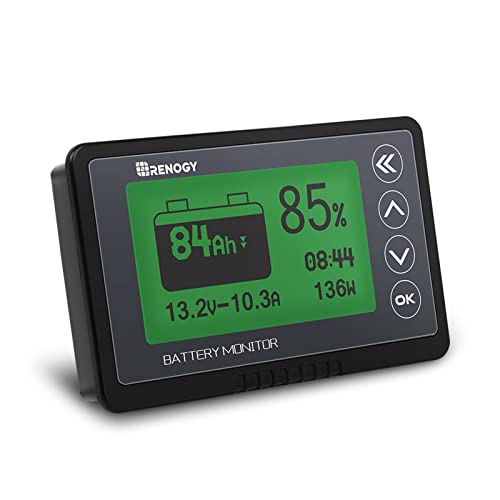
Renogy 500A Battery Monitor with Shunt
$63.10Includes a wired display head, which gives a readout without needing a phone in hand every time, a real convenience for anyone who does not want to rely on Bluetooth.
Best for: A panel-mounted readout.
Check price on Amazon
LiTime 500A Bluetooth Battery Monitor
$109.99Covers an 8V to 120V range, so the same shunt keeps working if the system is later reconfigured to 24V or 48V, a step most single-battery 12V setups will never need to take.
Best for: A build that may change system voltage later.
Check price on AmazonFrequently asked questions
- Why does my battery monitor show a different percentage than my inverter's display?
- The inverter's built-in display is usually reading voltage, while a shunt-based monitor is counting actual amp-hours in and out. On LiFePO4, voltage stays nearly flat across most of the usable range, so the inverter's voltage-based guess can be well off from the shunt's amp-hour count. Trust the shunt reading over a voltage-based estimate whenever the two disagree.
- Where should the shunt be installed, positive or negative?
- On the negative cable, between the battery's negative terminal and everything else the bank connects to, including chassis ground. Every amp flowing in or out of the battery has to pass through that one point for the monitor's amp-hour counting to be accurate. Wiring anything to the battery side of the shunt instead of the load side breaks that count and produces a state of charge reading that cannot be trusted.
- Can I use a battery monitor with a lead-acid battery too?
- Yes, shunt-based monitors work with any battery chemistry, including lead-acid and AGM. They are simply more necessary on lithium, since lead-acid's voltage sags more noticeably as it discharges, giving a voltmeter at least a rough read, while lithium's flat voltage curve makes a voltmeter far less useful by comparison.
- Does a Bluetooth-only monitor work without a phone nearby?
- The shunt itself keeps counting amp-hours regardless of whether a phone is connected, but a Bluetooth-only unit like the Victron SmartShunt or LiTime shunt has no way to display that reading without a phone or tablet running the app nearby. A monitor with a wired display head, like the Renogy or AILI units, gives a readout without needing a phone at all.
- How accurate is state of charge from a shunt over time?
- Very accurate day to day, but small measurement errors can accumulate over many charge cycles, a phenomenon called drift. Most shunt monitors correct for this automatically once the battery reaches a full charge and the charging current tapers to near zero, which resynchronizes the counter back to 100 percent, so a bank that regularly reaches full charge stays more accurate than one that rarely does.
- What amp rating shunt do I need for a 2000W inverter?
- A 2000W inverter on a 12V bank can draw close to 196A at full load, so a 500A-rated shunt, which is what every monitor in this roundup uses, comfortably covers that with margin. A 500A shunt also leaves headroom if the inverter is later upgraded to a 3000W unit drawing closer to 294A.
Sync the monitor to a real full charge before trusting its numbers. A shunt monitor's amp-hour count can drift over many cycles, and letting the bank reach a true full charge, where charging current tapers to near zero, is what most monitors use to resynchronize back to 100 percent. Skipping that step lets small errors compound over time.